
Magazine Archive
Home -> Magazines -> Issues -> Articles in this issue -> View
Technics KN2000 Workstation | |
Crossing the Great DivideArticle from Sound On Sound, August 1993 | |
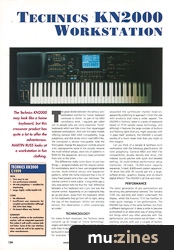
The Technics KN2000 may look like a home keyboard but this crossover product has quite a lot to offer the adventurous. Martin Russ looks at a workstation in fun clothing.
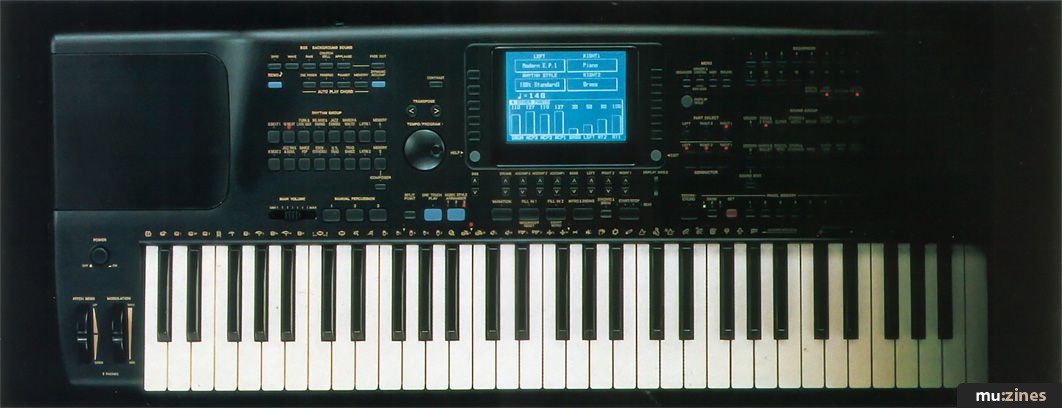
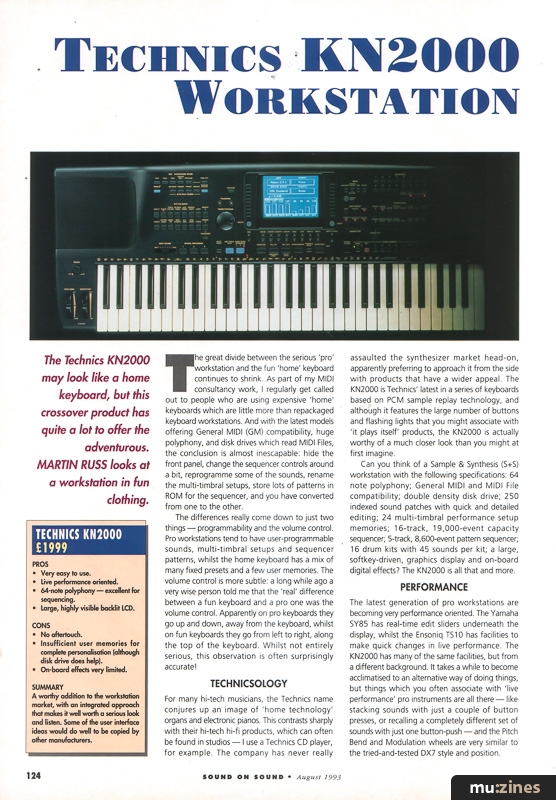
The great divide between the serious 'pro' workstation and the fun 'home' keyboard continues to shrink. As part of my MIDI consultancy work, I regularly get called out to people who are using expensive 'home' keyboards which are little more than repackaged keyboard workstations. And with the latest models offering General MIDI (GM) compatibility, huge polyphony, and disk drives which read MIDI Files, the conclusion is almost inescapable: hide the front panel, change the sequencer controls around a bit, reprogramme some of the sounds, rename the multi-timbral setups, store lots of patterns in ROM for the sequencer, and you have converted from one to the other.
The differences really come down to just two things — programmability and the volume control. Pro workstations tend to have user-programmable sounds, multi-timbral setups and sequencer patterns, whilst the home keyboard has a mix of many fixed presets and a few user memories. The volume control is more subtle: a long while ago a very wise person told me that the 'real' difference between a fun keyboard and a pro one was the volume control. Apparently on pro keyboards they go up and down, away from the keyboard, whilst on fun keyboards they go from left to right, along the top of the keyboard. Whilst not entirely serious, this observation is often surprisingly accurate!
TECHNICSOLOGY
For many hi-tech musicians, the Technics name conjures up an image of 'home technology' organs and electronic pianos. This contrasts sharply with their hi-tech hi-fi products, which can often be found in studios — I use a Technics CD player, for example. The company has never really assaulted the synthesizer market head-on, apparently preferring to approach it from the side with products that have a wider appeal. The KN2000 is Technics' latest in a series of keyboards based on PCM sample replay technology, and although it features the large number of buttons and flashing lights that you might associate with 'it plays itself' products, the KN2000 is actually worthy of a much closer look than you might at first imagine.
Can you think of a Sample & Synthesis (S+S) workstation with the following specifications: 64 note polyphony; General MIDI and MIDI File compatibility; double density disk drive; 250 indexed sound patches with quick and detailed editing; 24 multi-timbral performance setup memories; 16-track, 19,000-event capacity sequencer; 5-track, 8,600-event pattern sequencer; 16 drum kits with 45 sounds per kit; a large, softkey-driven, graphics display and on-board digital effects? The KN2000 is all that and more.
PERFORMANCE
The latest generation of pro workstations are becoming very performance oriented. The Yamaha SY85 has real-time edit sliders underneath the display, whilst the Ensoniq TS10 has facilities to make quick changes in live performance. The KN2000 has many of the same facilities, but from a different background. It takes a while to become acclimatised to an alternative way of doing things, but things which you often associate with 'live performance' pro instruments are all there — like stacking sounds with just a couple of button presses, or recalling a completely different set of sounds with just one button-push — and the Pitch Bend and Modulation wheels are very similar to the tried-and-tested DX7 style and position.
After years of thinking about patches and performances, it comes as a shock to encounter a different way of doing things. Technics assign sounds to parts of the keyboard, called, obviously enough, Left, Right 1 and Right 2. The left hand sound is often a bass sound, whilst the right hand sounds are automatically stacked — so pads and lead sounds are very easy to set up: you press the Part Select button and choose the sound. Three 'Conductor' buttons let you choose which of these three major parts will be played by the keyboard, so if you choose just the two right parts, then those sounds play across the whole keyboard, whilst selecting a left and right part introduces a split point. Given the complexity of some manufacturers' approach to this sort of basic functionality, the KN2000 comes as a real breath of fresh air.
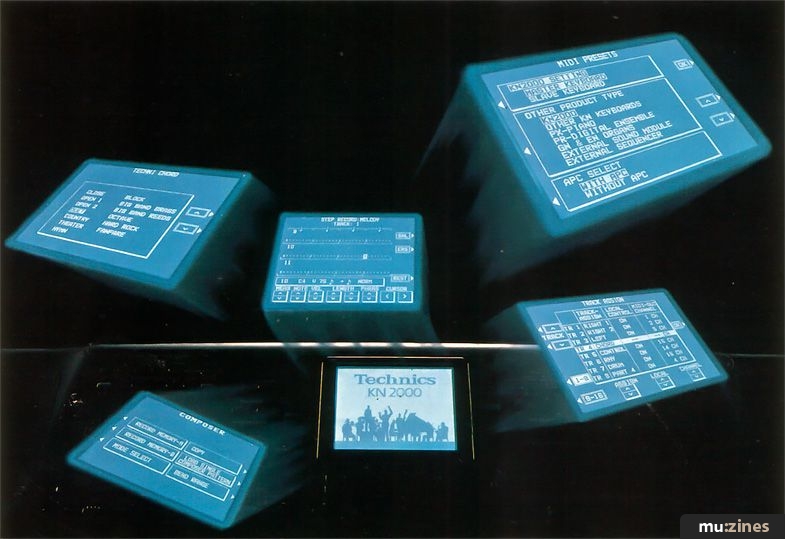
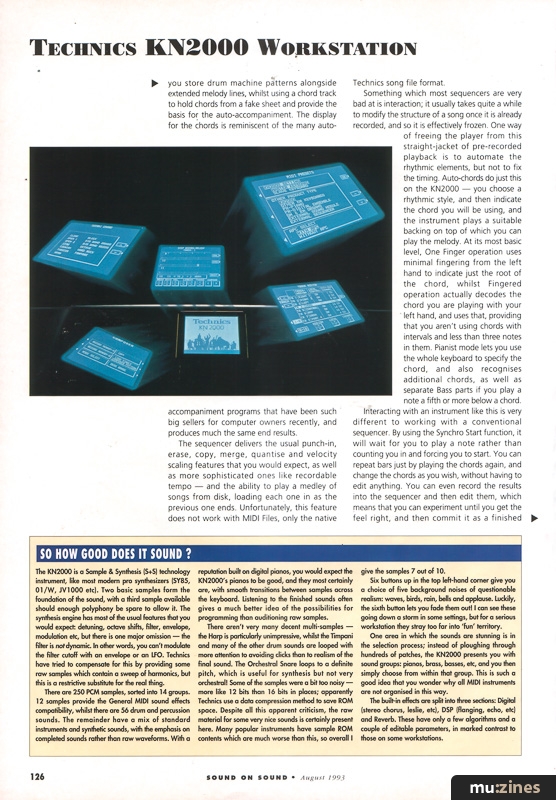
Trying to find a sound is easy too. You press one of the Sound Group buttons, and the large blue backlit LCD display then shows you some of the sounds in that group. You use the softkeys around the display to either choose a sound, or move to another screen of your choice. The Split Point is similarly undemanding — you press the split point button and it advances between three preset positions, indicated by LEDs, or a fourth preset position. If you hold the button down, then the display changes to a keyboard display and invites you to press a key, which sets and shows you the custom split point graphically.
These two examples say almost everything about the KN2000 user interface. Pressing buttons normally selects the named function, whilst pressing and holding the button down for a couple of seconds accesses more information — usually on the LCD display. The display itself is surrounded by 18 softkeys, as well as an Exit and Help button. To leave a screen you press the Exit button, whilst the Help button calls up a series of pages of in-context help. The softkeys let you set and/or alter any of the parameters, although the lower eight are in pairs and act also as slider control replacements for parameter setting and real-time mixing of the parts. The rest of the buttons on the KN2000's panel have one function each — no shifting or multi-coloured labelling needed here. So the two Transpose buttons do just that, and that alone. The rotary dial is the one exception: it normally sets the tempo, but when you are editing, it lets you quickly change parameter values — neat and obvious.
SEQUENCING
One aspect which will be familiar to most workstation-aware people is the sequencer, although features like the video recorder style 'Easy Record' will take some of the mystique away. With 16 tracks to work with, both real-time and step time-entry, and the auto-accompaniment included as well, the KN2000's sequencer offers a mix of linear and pattern approaches which let you store drum machine patterns alongside extended melody lines, whilst using a chord track to hold chords from a fake sheet and provide the basis for the auto-accompaniment. The display for the chords is reminiscent of the many auto-accompaniment programs that have been such big sellers for computer owners recently, and produces much the same end results.
The sequencer delivers the usual punch-in, erase, copy, merge, quantise and velocity scaling features that you would expect, as well as more sophisticated ones like recordable tempo — and the ability to play a medley of songs from disk, loading each one in as the previous one ends. Unfortunately, this feature does not work with MIDI Files, only the native Technics song file format.
Something which most sequencers are very bad at is interaction; it usually takes quite a while to modify the structure of a song once it is already recorded, and so it is effectively frozen. One way of freeing the player from this straight-jacket of pre-recorded playback is to automate the rhythmic elements, but not to fix the timing. Auto-chords do just this on the KN2000 — you choose a rhythmic style, and then indicate the chord you will be using, and the instrument plays a suitable backing on top of which you can play the melody. At its most basic level, One Finger operation uses minimal fingering from the left hand to indicate just the root of the chord, whilst Fingered operation actually decodes the chord you are playing with your left hand, and uses that, providing that you aren't using chords with intervals and less than three notes in them. Pianist mode lets you use the whole keyboard to specify the chord, and also recognises additional chords, as well as separate Bass parts if you play a note a fifth or more below a chord.
Interacting with an instrument like this is very different to working with a conventional sequencer. By using the Synchro Start function, it will wait for you to play a note rather than counting you in and forcing you to start. You can repeat bars just by playing the chords again, and change the chords as you wish, without having to edit anything. You can even record the results into the sequencer and then edit them, which means that you can experiment until you get the feel right, and then commit it as a finished sequence. This just has to be more creative than using a normal sequencer.
RHYTHM
Traditional organ auto-accompaniments play rhythms like Beguines and Sambas, and everything sounds much the same: lifeless. Happily, times have changed — and how! The KN2000 has 200 rhythms stored in named groups — very much the same organisation as the sounds. You choose a type of rhythm and then a specific example from the display. The range of presets is wide — from Heavy Metal in the 8 Beat group, via 70s Disco and House in the Dance Pop group, to Bluegrass and Gospel Shuffles in the US Trad section. The Sambas, Tangos and Bossanovas have been joined by Boleros and Salsas too. With 16 different kits of drum sounds to choose from, the percussion is as varied as the rhythms.
The Composer function lets you edit the preset rhythm patterns, or create your own, and then store them in one of the 12 memories. Each pattern can be made up of the basic rhythm, plus intro, fill-in and ending sections, and consists of the drum or percussion part, three parts of accompaniment, and the bass part. Since the instrumentation of all these parts forms part of the rhythm, the 'feel' of the resulting music can be very different for each style. Recording patterns can be done in step- or real-time, with detailed editing of individual notes in the display.
Once you have set up a rhythm, you will obviously want to choose the left and right hand parts to suit the style. But if you are feeling lazy, then the One Touch Play, Music Style Select feature lets you choose a complete setting of rhythm and instrumentation by selecting from a scrolling list. With more than 40 styles per rhythm group, there are 600 to choose from. The German Oompah band, Swedish Pop and Aloha Voices give you some of the varying flavours of instant music that is available. Of course, by storing your own sounds in the panel memory, and then saving the settings to disk, you could produce your own customised settings with relative ease. Just because Technics have chosen to use somewhat cliched styles does not mean that the KN2000 is restricted to this — it is a powerful tool which can also be used to make your own music. Actually, some of the styles are very impressive and contemporary sounding, and they really do make you want to compose around them, which can't be bad. It only took me a few minutes to programme a rhythm style based on the Tangerine Dream school of overbusy bass lines, complete with fills and intro/outro...
CONCLUSION
The KN2000 is very close to being usable as a pro workstation. The synthesis technology is not quite 'cutting edge', and the effects are somewhat limited, but it is not very far off target. With careful use of the user programmable memories, it should be possible for a talented individual to use the KN2000 to produce live performances which would be comparable with those from a pro workstation, and definitely more interactive. The stunning aspect is the way that the instrument uses all of its capabilities in a co-ordinated manner, the exact opposite to the way in which most pro gear works. The KN2000 works with you to produce a performance, whereas most workstations need to be forced into it.
If you look at this sort of instrument without any preconceptions, then you may well be pleasantly surprised. I certainly enjoyed playing the KN2000, and it was a lot easier to use than many of the pro workstations I have encountered. Definitely worth a close look, especially if you want a workstation that won't overwhelm you with technology.
Further Information
KN2000 £1,999 inc VAT.
Technics, (Contact Details).
TECHNICS KN2000 £1999
• Very easy to use.
• Live performance oriented.
• 64-note polyphony — excellent for sequencing.
• Large, highly visible backlit LCD.
CONS
• No aftertouch.
• Insufficient user memories for complete personalisation (although disk drive does help).
• On-board effects very limited.
SUMMARY
A worthy addition to the workstation market, with an integrated approach that makes it well worth a serious look and listen. Some of the user interface ideas would do well to be copied by other manufacturers.
MIDI FACILITIES
MIDI input and output settings let you choose master or slave keyboard operation, as well as comprehensive controls over program changes and other performance controllers. With System Exclusive dumps and General MIDI as well, the KN2000's MIDI implementation is comprehensive — and perhaps better than some workstations.
SO HOW GOOD DOES IT SOUND?
There are 250 PCM samples, sorted into 14 groups. 12 samples provide the General MIDI sound effects compatibility, whilst there are 56 drum and percussion sounds. The remainder have a mix of standard instruments and synthetic sounds, with the emphasis on completed sounds rather than raw waveforms. With a reputation built on digital pianos, you would expect the KN2000's pianos to be good, and they most certainly are, with smooth transitions between samples across the keyboard. Listening to the finished sounds often gives a much better idea of the possibilities for programming than auditioning raw samples.
There aren't very many decent multi-samples — the Harp is particularly unimpressive, whilst the Timpani and many of the other drum sounds are looped with more attention to avoiding clicks than to realism of the final sound. The Orchestral Snare loops to a definite pitch, which is useful for synthesis but not very orchestral! Some of the samples were a bit too noisy — more like 12 bits than 16 bits in places; apparently Technics use a data compression method to save ROM space. Despite all this apparent criticism, the raw material for some very nice sounds is certainly present here. Many popular instruments have sample ROM contents which are much worse than this, so overall I give the samples 7 out of 10.
Six buttons up in the top left-hand corner give you a choice of five background noises of questionable realism: waves, birds, rain, bells and applause. Luckily, the sixth button lets you fade them out! I can see these going down a storm in some settings, but for a serious workstation they stray too far into 'fun' territory.
One area in which the sounds are stunning is in the selection process; instead of ploughing through hundreds of patches, the KN2000 presents you with sound groups: pianos, brass, basses, etc, and you then simply choose from within that group. This is such a good idea that you wonder why all MIDI instruments are not organised in this way.
The built-in effects are split into three sections: Digital (stereo chorus, leslie, etc), DSP (flanging, echo, etc) and Reverb. These have only a few algorithms and a couple of editable parameters, in marked contrast to those on some workstations.
POLYPHONY MEASUREMENTS
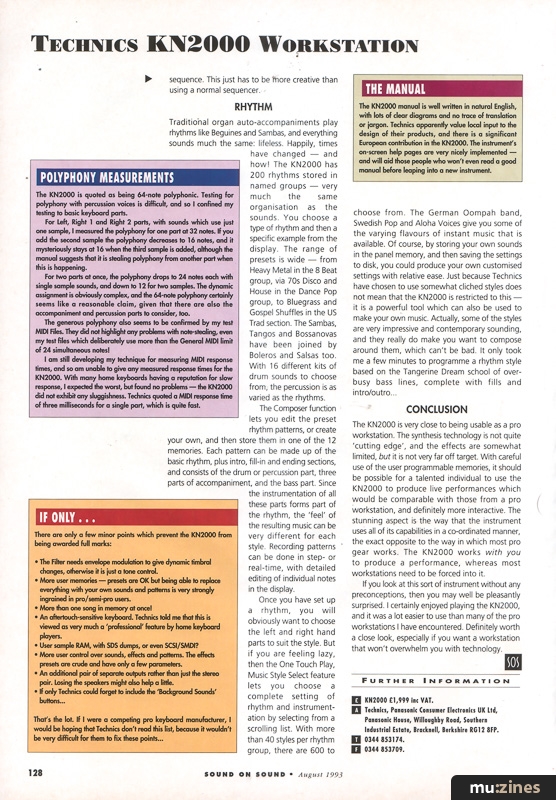
For Left, Right 1 and Right 2 parts, with sounds which use just one sample, I measured the polyphony for one part at 32 notes. If you add the second sample the polyphony decreases to 16 notes, and it mysteriously stays at 16 when the third sample is added, although the manual suggests that it is stealing polyphony from another part when this is happening.
For two parts at once, the polyphony drops to 24 notes each with single sample sounds, and down to 12 for two samples. The dynamic assignment is obviously complex, and the 64-note polyphony certainly seems like a reasonable claim, given that there are also the accompaniment and percussion parts to consider, too.
The generous polyphony also seems to be confirmed by my test MIDI Files. They did not highlight any problems with note-stealing, even my test files which deliberately use more than the General MIDI limit of 24 simultaneous notes!
I am still developing my technique for measuring MIDI response times, and so am unable to give any measured response times for the KN2000. With many home keyboards having a reputation for slow response, I expected the worst, but found no problems — the KN2000 did not exhibit any sluggishness. Technics quoted a MIDI response time of three milliseconds for a single part, which is quite fast.
IF ONLY...
• The Filter needs envelope modulation to give dynamic timbral changes, otherwise it is just a tone control.
• More user memories — presets are OK but being able to replace everything with your own sounds and patterns is very strongly ingrained in pro/semi-pro users.
• More than one song in memory at once!
• An aftertouch-sensitive keyboard. Technics told me that this is viewed as very much a 'professional' feature by home keyboard players.
• User sample RAM, with SDS dumps, or even SCSI/SMDI?
• More user control over sounds, effects and patterns. The effects presets are crude and have only a few parameters.
• An additional pair of separate outputs rather than just the stereo pair. Losing the speakers might also help a little.
• If only Technics could forget to include the 'Background Sounds' buttons...
That's the lot. If I were a competing pro keyboard manufacturer, I would be hoping that Technics don't read this list, because it wouldn't be very difficult for them to fix these points...
THE MANUAL
Also featuring gear in this article
Publisher: Sound On Sound - SOS Publications Ltd.
The contents of this magazine are re-published here with the kind permission of SOS Publications Ltd.
The current copyright owner/s of this content may differ from the originally published copyright notice.
More details on copyright ownership...

Sound On Sound - Aug 1993
Gear in this article:
Review by Martin Russ
Ads for Gear in this article:


Help Support The Things You Love
mu:zines is the result of thousands of hours of effort, and will require many thousands more going forward to reach our goals of getting all this content online.
If you value this resource, you can support this project - it really helps!
Donations for May 2026
Issues donated this month: 0
New issues that have been donated or scanned for us this month.
Funds donated this month: £0.00
All donations and support are gratefully appreciated - thank you.
Magazines Needed - Can You Help?
Do you have any of these magazine issues?
If so, and you can donate, lend or scan them to help complete our archive, please get in touch via the Contribute page - thanks!
Please Contribute to mu:zines by supplying magazines, scanning or donating funds. Thanks!
Monetary donations go towards site running costs, and the occasional coffee for me if there's anything left over!

 @mu_zines
 RSS Feed
 Blog
Blog